How prospects create trial tenants on their own, how to choose the plan trials run on, and how to follow the trial requests.
For site operators. Choosing the trial plan needs manage service plans; the trial requests list needs manage licenses; the trial request policy needs manage site configuration.
How a self-service trial works
Trials run without an operator. A prospect:
- opens the public trial page at
/trialand types an email address; - receives an email with a link to create the trial, valid for the time set in the trial request policy;
- opens the link; their browser solves a short puzzle that makes mass sign-ups expensive, and the page asks for the organization's name and slug, their name and a password, and an optional message;
- gets a tenant of their own, with themselves as its first administrator and a license on the trial plan, and a welcome email with the tenant's login address.
At the same moment the site's operations emails receive Trial tenant provisioned: <organization>, with the organization, the first user, the login address, the addresses the request came from and the prospect's message.
The member part describes the prospect's side of these steps: Plans and the free trial.
A trial tenant is an ordinary tenant. When its trial license ends, it lapses and later closes like any other, unless its administrators subscribe to a plan and top up the balance, or you issue a license.
The trial plan
Every trial gets a license on the trial plan, lasting as long as that plan's terms on sale say. One plan at a time is the trial plan. It may be private.
- Open Service plans. In the Trials column, find the plan you want. A plan without terms on sale says "needs terms on sale".
- Choose Use for trials on that plan's row, or on its plan page. It replaces the current choice.
The plan now carries the "trial plan" badge, and new trials get licenses on it. Trial licenses already issued are not affected. To stop offering trials, choose Stop beside the badge (or Stop using for trials on the plan page) and confirm.

Trial requests
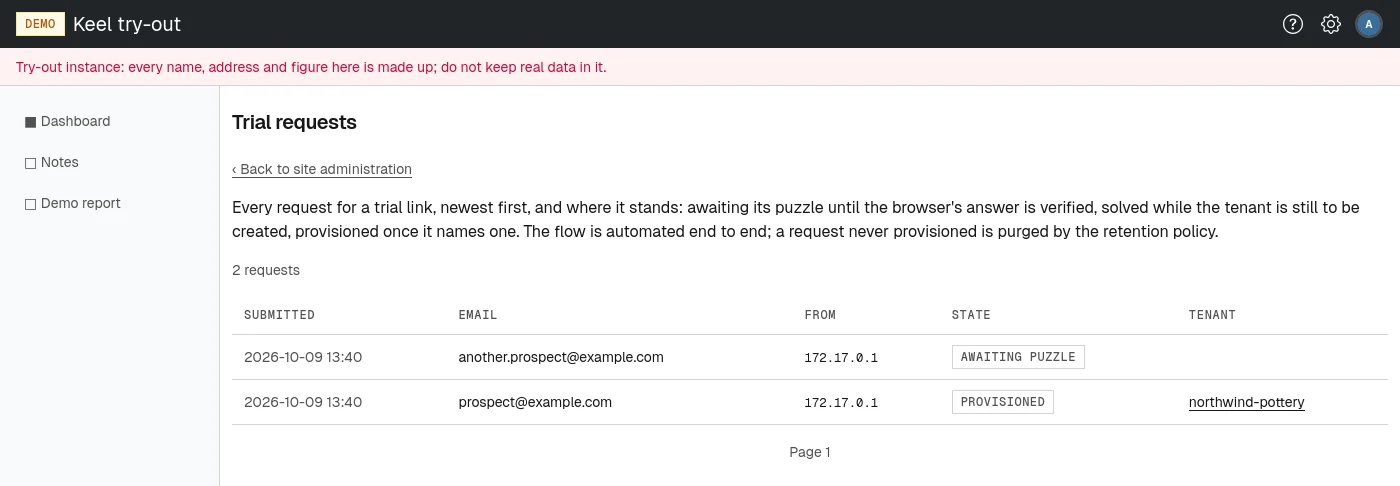
Open Trial requests on the site administration page, or go to /site/admin/trial-requests. Every request for a trial link is listed, newest first, 50 to a page, with the total count above the table. Each row shows:
- Submitted: when the email address was typed in;
- Email: the address the link was sent to;
- From: the network address the request came from;
- State: "awaiting puzzle" until the browser's answer is verified, "solved" while the tenant is still to be created, "provisioned" once it has become a tenant;
- Tenant: for a provisioned request, a link to the tenant's page.
The page is for looking only: there is nothing to approve. A request that is never provisioned is deleted after the period set in the site retention policy. A provisioned request stays with its tenant.
Protecting the trial form
The trial request policy sets how long the emailed link stays valid, how many requests one network address and one email address may make within a time window, and how hard the puzzle is.