How your organization's subscription, licenses and automatic renewal work, and which billing emails you receive.
For administrators who hold the permission manage tenant billing.
How paying for Keel Platform works
- Your organization uses Keel Platform under a license: a plan, for a term such as a month or a year. While a license is in force, members can sign in.
- The subscription says which plan, and in which currency, your organization renews into when the current license ends.
- You pay in advance, by bank transfer, into a prepaid balance. Shortly before a license ends, Keel Platform takes the next term's price from the balance, issues the new license and an invoice. See Balance, top-ups and invoices.
Licenses themselves are issued by Keel Platform: either by this automatic renewal, or by the operators of your Keel Platform site.
The billing page
Open Billing from the administration page or the settings menu. The page is at /tenants/<your tenant>/admin/billing and has three tabs:
- Licenses: the subscription and every license.
- Balance: the prepaid balance, where to send a top-up, and the statement.
- Invoices: the billing details and every invoice.
The page is for reading. You change the subscription and the billing details on their own pages, linked from here.
Choosing or changing the subscription
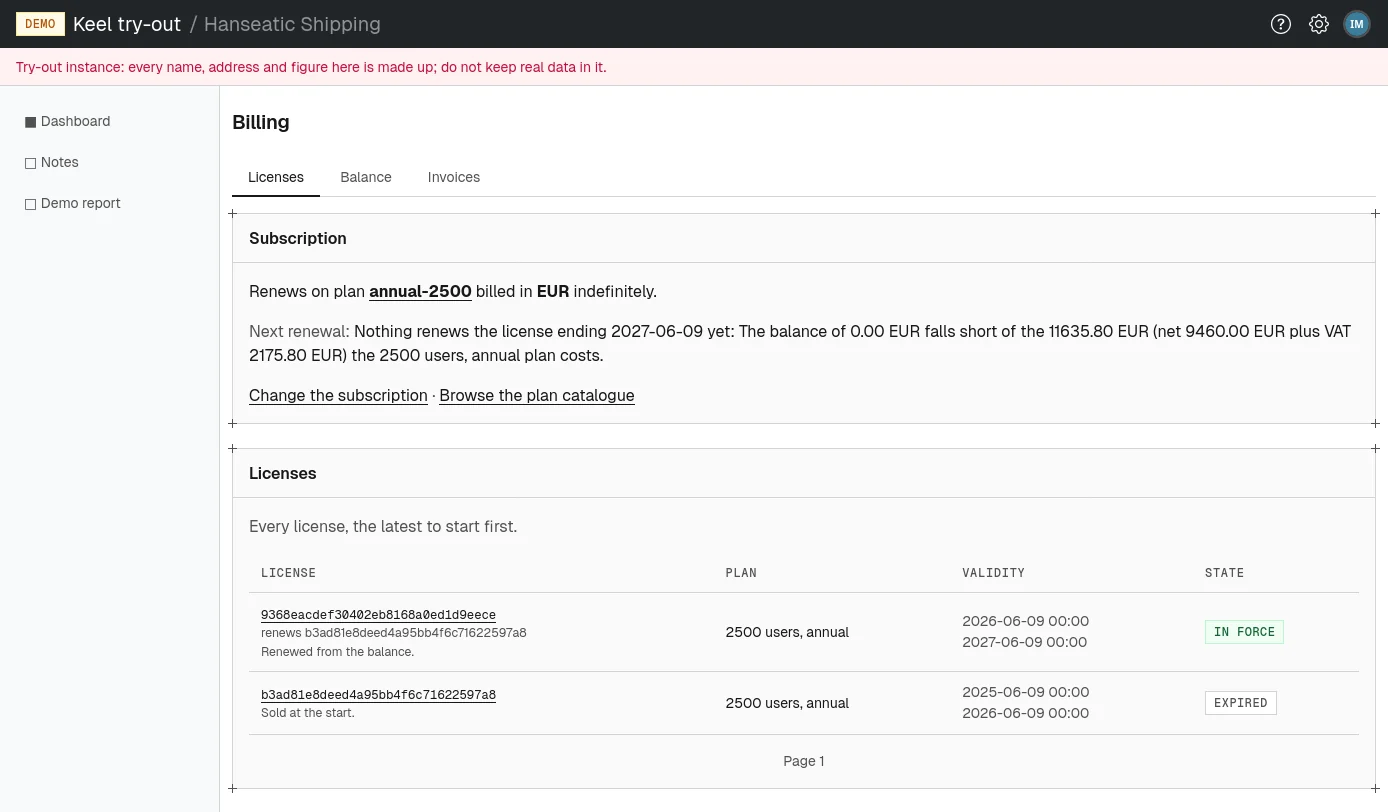
The Subscription card says which plan your organization renews on, in which currency, and until when, for example "Renews on plan" followed by the plan's short name, "billed in EUR indefinitely." It also says when and how the next renewal is expected. Without a subscription it says "No renewal subscription is set; the license simply runs out."
- On the Licenses tab, choose Change the subscription. To compare plans first, choose Browse the plan catalogue.
- The page lists the plans on sale now, each with its name, term and summary. For a free plan, choose Free. For a priced plan, choose one of its prices: the price and currency you choose (for example 99 EUR net) is what you will be billed in.
- Optionally, set Subscribed until. Leave it empty to keep renewing until you cancel.
- Choose Save subscription.
Changing the subscription changes what the next renewal buys. It does not change or cut the license in force: members keep signing in under it until it ends. Renewals are paid only from the balance in the subscription's currency.
To cancel renewing, choose Clear this value on the subscription page. The current license runs to its end, and nothing renews it.
Licenses
The Licenses card lists every license, the latest to start first, twelve to a page. Each row shows the license's short identifier, the license it renews if any, the plan, the period it is valid for, and its state: in force, upcoming, expired or revoked.
Choose a license's identifier to open its page. It shows when it is valid, its state, what was paid for it and under which invoice (or "nothing: it was issued without a charge"), and The terms it was issued under.
What a license's terms promise
| Term | Meaning |
|---|---|
| Term | How long one license lasts, such as 1 month or 1 year. |
| Daily users | How many different members may use Keel Platform on one day. |
| Renewal notice | How long before the end Keel Platform warns you if the renewal cannot be paid. |
| Grace | How long after the end members can still sign in, before your organization is closed. |
| Retention | How long after closing your organization's data is kept, before it is deleted. |
| Price | The net price per term in each currency, or Free. |
When more people use Keel Platform than the plan allows
If, within 24 hours, the number of different members who start a session goes more than a tenth over the plan's daily users, Keel Platform turns away new sign-ins. Members already active that day can keep signing in, and new ones are let in again once usage falls back. The billing contacts receive the email "Sessions are being refused on the ... plan". Move to a larger plan to lift the limit.
Automatic renewal
Shortly before a license ends (12 hours unless your site is set up differently), Keel Platform checks whether the balance in the subscription's currency covers the next term's price, including VAT. If it does, Keel Platform takes the amount from the balance, issues the next license to start when the current one ends, and issues an invoice. A free plan renews without a charge.
A renewal also needs billing details on record and a subscription that has not ended. If something is missing or the balance falls short, nothing renews. Top up in time (see Topping up): Keel Platform checks again every hour until the license ends, and a top-up that arrives during the grace period still renews it.
If a license ends without a renewal:
- Your organization is lapsed. Members can still sign in while the grace period of the terms lasts.
- When the grace ends, it is closed. Nobody can sign in, but the data is kept.
- When the retention of the terms has passed since the closing, its data is deleted for good.
The site's operators can also suspend, close or reinstate an organization; contact them if your organization was closed by mistake.
Billing emails
Keel Platform sends these emails to the Billing email in your billing details (see Billing details). The site's own billing staff receive a copy.
| Subject | When | What it says |
|---|---|---|
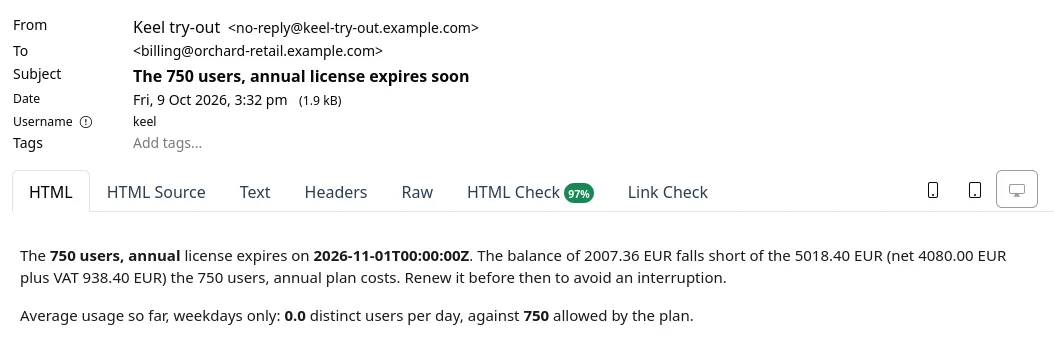
| The ... license expires soon | Once per license, when the renewal notice period begins and the renewal cannot go ahead | When the license expires, why it will not renew (usually a balance too low), and average weekday use against the plan's daily users, with a hint to choose a larger plan if usage runs above it. |
| The ... license was renewed | After each automatic renewal | The new period, the amount taken from the balance with its VAT, and the invoice number. |
| Sessions are being refused on the ... plan | At most once a day while new sign-ins are refused | How many different users signed in, against how many the plan allows. |
| Invoice ... was corrected | When the site's operators correct an invoice | Which invoice was corrected by which, how much was returned to the balance, and the reason. |
| VAT number ... rejected by VIES, or ... confirmed by VIES again | When the EU register (VIES) stops or starts confirming your VAT number again | The VAT number, what the register found and when, and the consequence: while the number is rejected, automatic renewal is refused until a corrected number is confirmed. |
When your organization's status changes (for example to lapsed, closed or active again), an email "Tenant ... is now ..." goes to every member who holds manage tenant billing and to the billing email. It says the old and new status, why, and what it means for members.