Where the pages for running the whole site are, which site permission opens each of them, and how the operators tenant decides who is an operator.
For site operators: members of the operators tenant whose roles grant at least one site permission. The Site operators page needs any site permission; every other area needs the permission named below.
Reaching site administration
You sign in like any member, to the operators tenant (in the try-out it is called operators). See Signing in and out. Once you hold a site permission, two things appear:
- The settings menu (the gear icon at the top right) starts with Site administration, followed by a link to each site area you may open. If you also administer the operators tenant itself, its own Administration links follow below a divider.
- The address
/site/adminopens the Site administration page: one card per area, each with a sentence on what it is for and, for some, a figure worth knowing before you go in.
The page shows only the cards your permissions open. A member with no site permission at all is refused the page.
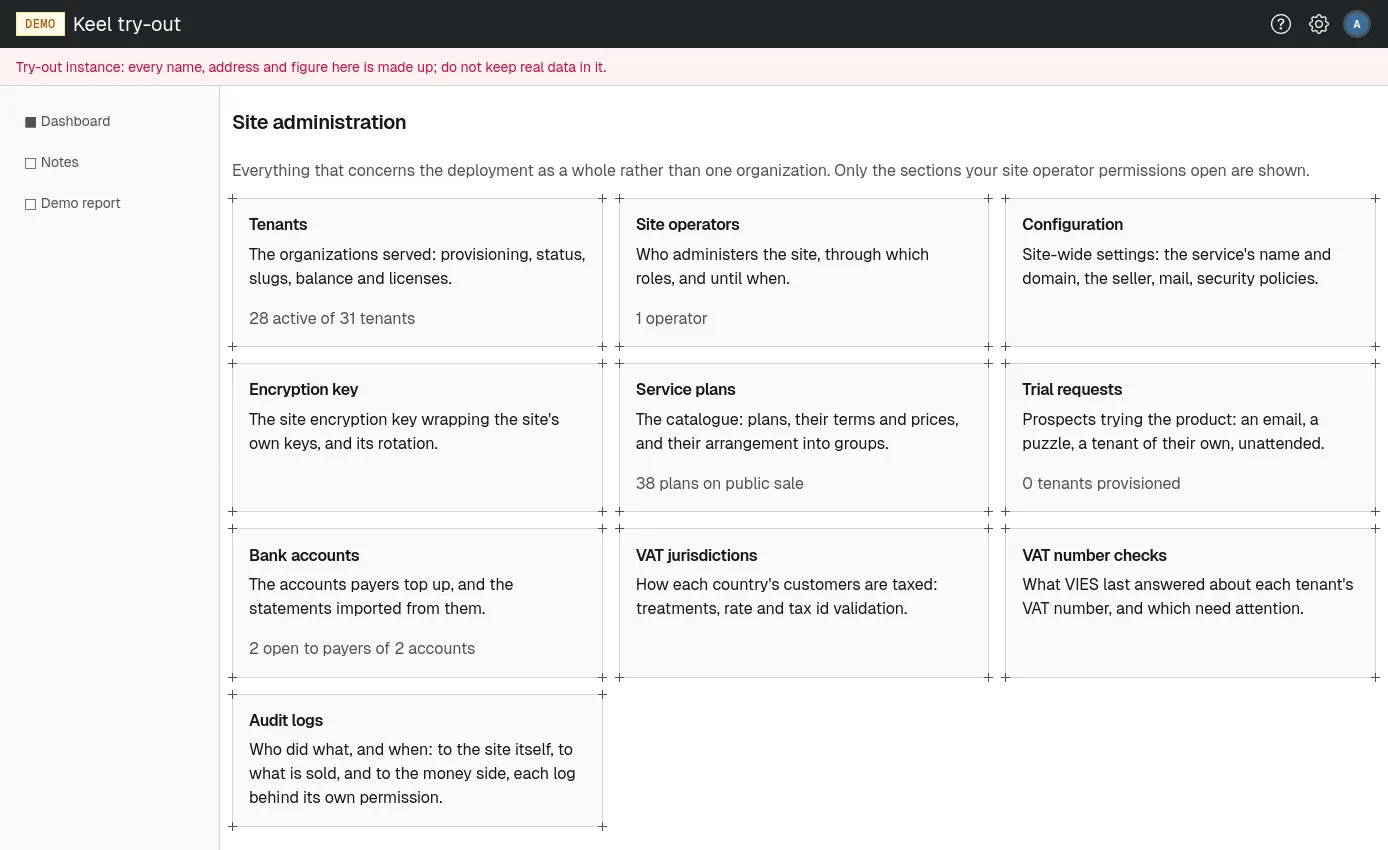
Areas and the permissions that open them
| Card | Address | Shown to holders of | Figure on the card |
|---|---|---|---|
| Tenants | /site/admin/tenants | manage tenants | active tenants of all tenants |
| Site operators | /site/admin/operators | any site permission | number of operators |
| Configuration | /site/admin/properties | manage site configuration | |
| Encryption key | /site/admin/encryption-key | rotate site encryption key | |
| Service plans | /site/admin/service-plans | manage service plans or manage licenses | plans on public sale |
| Trial requests | /site/admin/trial-requests | manage service plans or manage licenses | tenants provisioned from trials |
| Bank accounts | /site/admin/bank-accounts | manage site billing | accounts open to payers of all accounts |
| VAT jurisdictions | /site/admin/vat-jurisdictions | manage site billing | |
| VAT number checks | /site/admin/tax-id-checks | manage site billing | |
| Audit logs | /site/admin/audit-logs | any of the three view audit log permissions |
The site permissions
Each site permission is one thing an operator may do. They exist only in the operators tenant and are granted through its roles, like any other permission.
- manage tenants
- Add and provision tenants, change their status and slugs, let someone back into a tenant, and fix a tenant's identity provider. Also opens the tenant pages.
- manage licenses
- Issue and revoke tenant licenses, from the tenant page. Also opens the trial requests list.
- manage service plans
- Manage the plans, their terms and prices, their groups and the trial plan.
- manage site billing
- Register bank accounts and import their statements, maintain the VAT jurisdictions, read the VAT number checks, open invoices and correct them.
- manage site configuration
- Change the site settings, such as the seller, the invoice series and mail delivery.
- rotate site encryption key
- Rotate the site encryption key.
- view core audit log, view licensing audit log, view billing audit log
- Read the corresponding audit log.
The operators tenant and its two setup roles
The operators tenant is the organization that runs the site, usually your own company or department. It is chosen once, when the site is set up, and cannot be replaced by another tenant later. Its members whose roles grant site permissions are the site's operators. The operators tenant needs no license and its status never changes, so its members can always sign in to fix licensing.
Two roles are created for it at setup:
- Site Setup Administrator holds every site permission: tenants, plans, licenses, billing, configuration, keys and the audit logs.
- Tenant Setup Administrator runs the operators tenant itself: its members, roles and groups. Whoever holds it decides who else operates the site.
Every operator added through the platform setup page gets both roles. To give someone a narrower job, for example only bank statements, create a role in the operators tenant with just the permissions needed and grant it to them. This is done on the operators tenant's own people and roles pages, the same pages any tenant administrator uses; see People in the administrator part.
The Site operators page
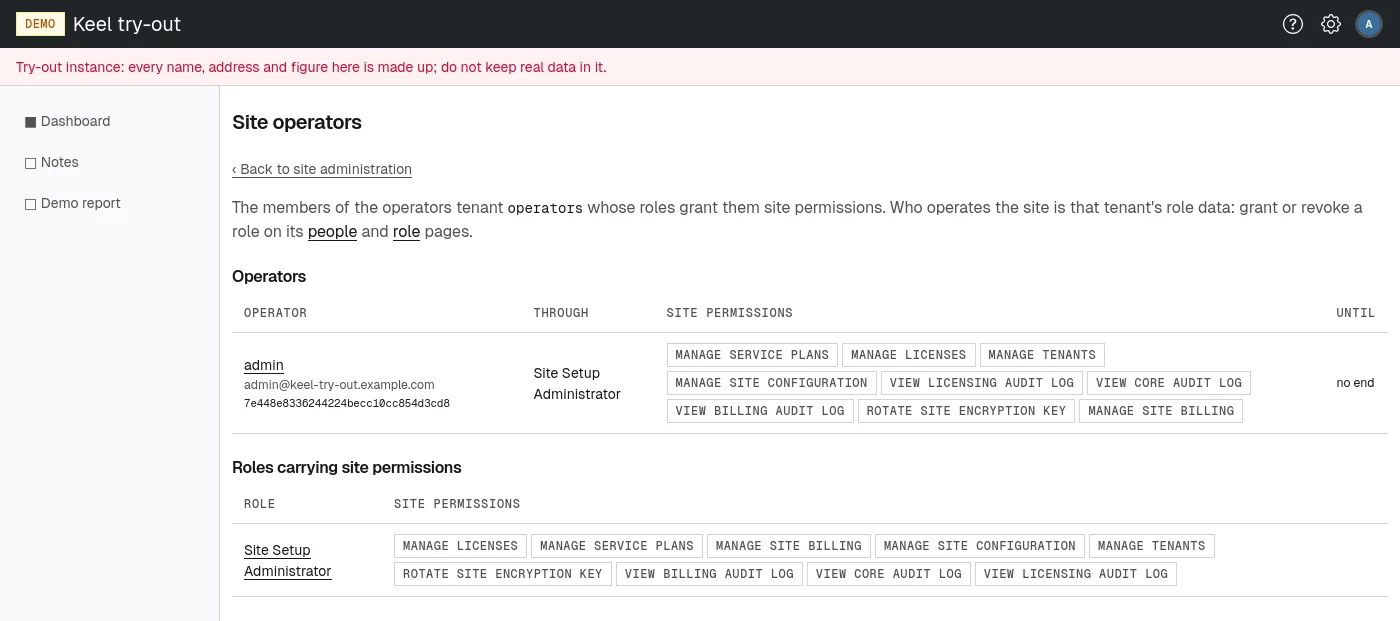
The Site operators page at /site/admin/operators is a read-only access list. It has two tables:
- Operators: every member who holds a site permission, with their email address and public id, the role that gives it to them (Through, with the group when the role comes through a group), the site permissions of that role, and Until, the end date of the grant or "no end".
- Roles carrying site permissions: every role of the operators tenant that grants at least one site permission.
To change who operates the site, grant or revoke a role on the operators tenant's people and role pages. If you hold manage users or manage roles in the operators tenant, the names on this page link straight to those pages.
Warnings above operator pages
Operators see a yellow warning above every page when something about the site as a whole needs attention:
- The secure (HTTPS) certificate could not be obtained or renewed.
- The platform setup token is configured: whoever runs the servers should remove it once setup is done. See Platform setup and recovery.
- On the configuration pages only: No operations address is set, so nobody would be told about a failed certificate renewal or a tenant's status change. Set one under Operations emails.