How the site settings editor works and what each site-level setting controls: the service's identity, the seller and invoicing, mail, security policies and retention.
For site operators with the manage site configuration permission, which is needed to read these pages as well as to change them.
The settings editor
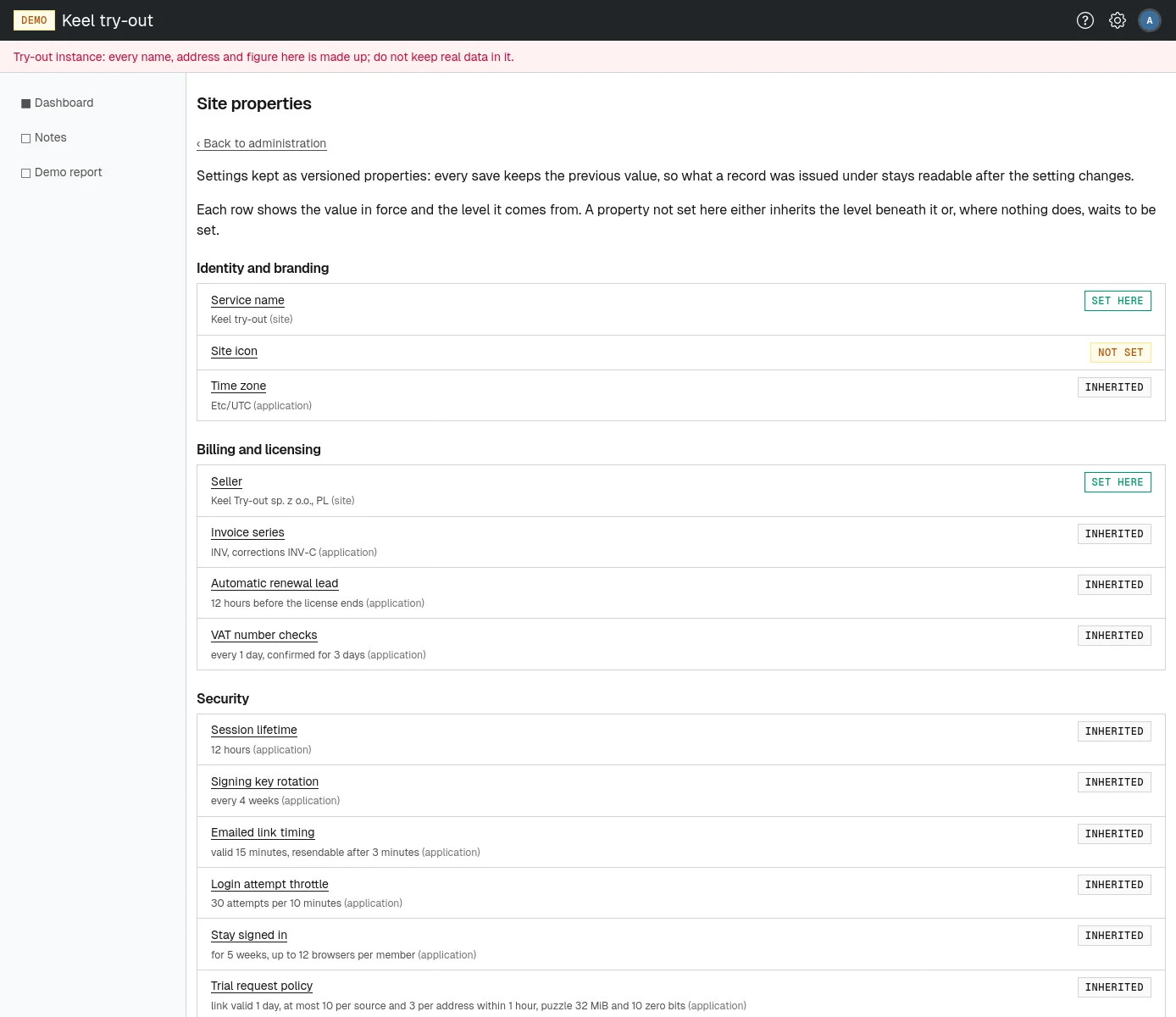
Open Configuration on the site administration page, or go to /site/admin/properties. The page Site properties lists every site setting under five headings: Identity and branding, Billing and licensing, Security, Notification and Compliance. Each row shows the value in force and where it comes from, with a badge:
- set here: a value saved at the site level;
- inherited: nothing is saved at the site level, so the application's built-in default applies;
- not set: no value at all yet. Some features wait for it, for example invoicing without a seller.
Some settings are defaults for every tenant: a tenant's own administrators can override them for their tenant (see Settings in the administrator part). These are the time zone, session lifetime, signing key rotation, emailed link timing, stay signed in, email carrier and tenant retention policy.
Changing a setting
- Choose the setting's name. Its page says The value stored at the site level and what is in force.
- Change the fields. Where a field has a default beneath it, the default is shown beside the field.
- Choose the save button, such as Save seller. A few settings ask for confirmation first.
The page says the setting was saved at the site level. Every save keeps the previous value, so records issued under an old value stay readable, and the change is recorded in the core audit log with the value that was set (a password or other secret is recorded only as present, never shown). To go back to the default, choose Clear this value and confirm: the history is kept and the value beneath applies again.
Durations, such as 1h or 2d, are typed with w weeks, d days, h hours, m minutes and s seconds. Periods, used for retention, are typed with y years, m months, w weeks and d days. Each page explains the form it expects.
Identity and branding
- Service name
- What the site calls itself. It heads every page and names the service in the mail it sends.
- Site icon
- The icon shown before the service name and in the browser tab, on every page including sign-in. Upload a square PNG, JPEG, SVG, WebP or GIF file of up to 64 KiB under Icon file and choose Save icon. Until one is set, the platform's own icon is shown.
- Time zone
- The zone dates and times are shown in, for every tenant that has not chosen its own and every member who has not chosen one on their profile. Changing it only changes how times are shown; nothing is lost.
Billing and licensing
- Seller
-
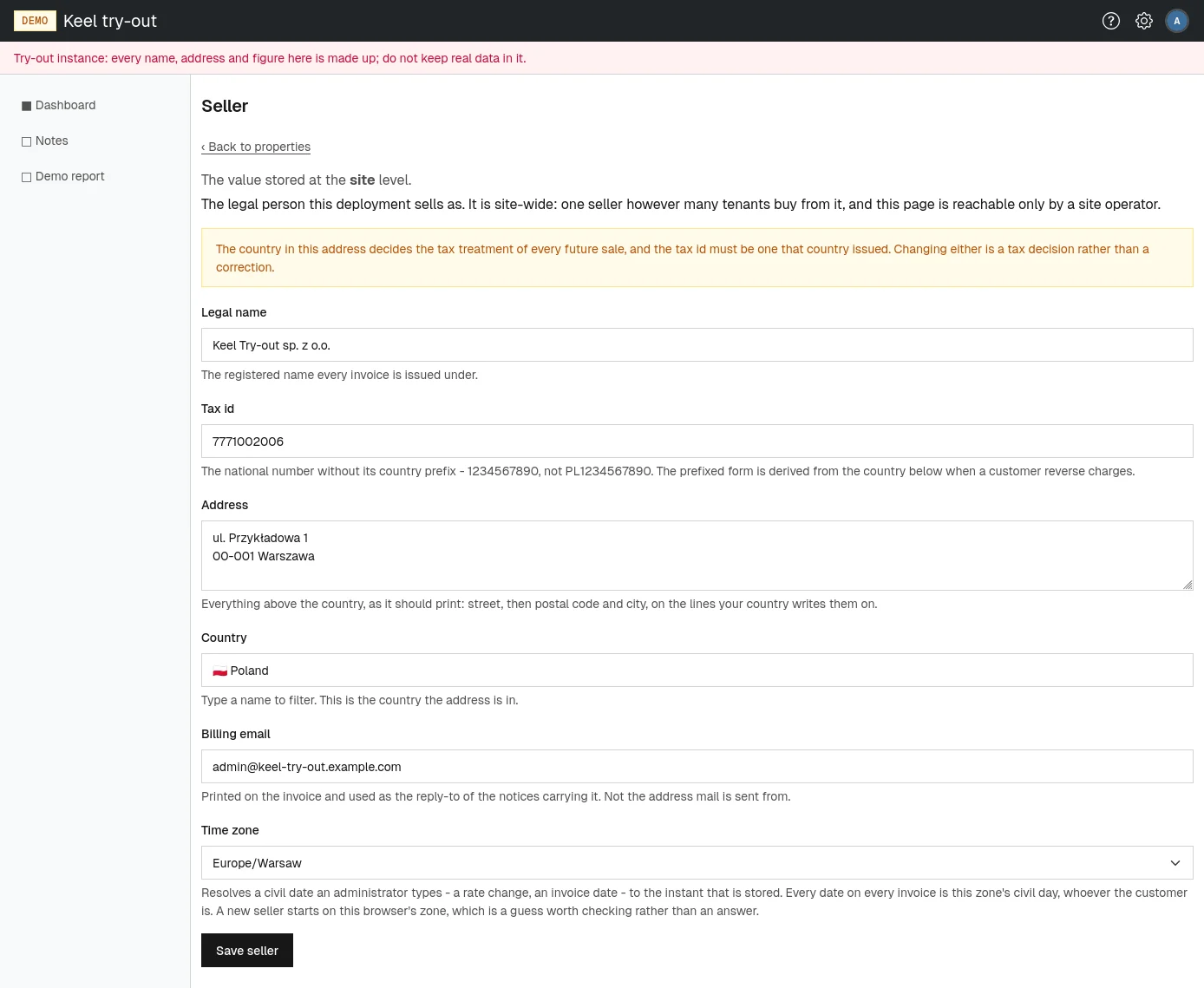
The legal person the site sells as, printed on every invoice: Legal name, Tax id (the national number without its country prefix), Address, Country, Billing email (printed on invoices and used as the reply-to address of billing notices, not the address mail is sent from) and Time zone (every date on every invoice is a day in this zone). No renewal or sale can be invoiced without a seller.
- Invoice series
- The prefixes invoice numbers are issued under, agreed with your accounting: the Invoice series (for example
INV/2026/42) and a different Correction series (for exampleINV-C/2026/7), each 2 to 16 uppercase letters, digits and inner hyphens. Each series numbers without gaps within a calendar year. If your company issues invoices from other systems too, reserve series for this service alone. Renaming is safe at any time: issued invoices keep their series, and the new series starts at 1. - Automatic renewal lead
- How long before a license ends the renewal is taken from the balance, between 1 hour and 7 days. See Automatic renewal.
- VAT number checks
- How often each buyer's EU VAT number is checked with VIES (Consult each number every, 1 hour to 7 days) and how long a confirmation backs a renewal (A confirmation backs a renewal for, 1 to 30 days, not shorter than the interval). A longer age lets renewals ride out a VIES outage. See VAT number checks.
The trial plan is chosen on the plans page, not here. See The trial plan.
Security
- Session lifetime
- How long someone stays signed in before signing in again, between 5 minutes and 24 hours. A change applies from the next sign-in.
- Signing key rotation
- How old the key that signs session cookies and emailed links may get before a fresh one is made, between 1 and 365 days. Rotating signs nobody out.
- Emailed link timing
- How long an emailed single-use link, such as a password link, keeps working (A link stays valid for, 1 minute to 7 days) and how soon another may be requested (Another may be requested after, at least 30 seconds and not longer than the lifetime).
- Login attempt throttle
- How many sign-in attempts are allowed (Attempts allowed) within a sliding window (Within, 1 minute to 24 hours) before the next is refused, counted both per network address and per account. Set it generously: everyone in an office behind one address shares the allowance.
- Stay signed in
- Whether members may choose to stay signed in on a browser they alone use, and for how long (A browser stays signed in for, 1 day to 1 year), and how many such browsers each member may keep (Browsers a member may keep, up to 120; 0 switches the choice off). A shorter lifetime also shortens browsers already chosen. See Staying signed in on a browser.
- Trial request policy
- How the public trial form is protected: how long the emailed link is valid (Link valid for, 1 hour to 2 days); how many requests one network address (Submissions per source address) and one email address (Submissions naming one email address) may make Within a window of 1 minute to 24 hours; and the puzzle the browser must solve, Memory (MiB) and Zero bits. Each extra zero bit doubles the prospect's expected wait; the defaults, 32 MiB and 10 bits, take under a minute on average on a current laptop. Keep the memory near 32 MiB and set the difficulty with the bits. See Trials.
- Password hashing cost
- How much work protecting each password takes: Memory (MiB), Passes and Lanes. A higher cost applies to passwords set from now on; existing passwords keep working. Saving asks for confirmation.
The operators tenant's identity provider is set on that tenant's own settings pages, or on the platform setup page.
Notification
- Email carrier
-
The mail server (SMTP relay) that outgoing mail is handed to: SMTP host, Encryption (use implicit TLS unless the relay offers only STARTTLS), SMTP port, SMTP username, SMTP password (stored encrypted and never shown again; leave it empty to keep the stored one), Sender name (optional) and Sender address. All mail goes out under this sender. Tenants without a carrier of their own use this one.
After saving, choose Send me a test message: a message goes to your own address through the carrier in effect, and the page shows its message id. Check your inbox (in the try-out, Mailpit at
http://localhost:8025). - Operations emails
- Where the service writes to the people who run it: tenant status changes, trial tenants provisioned, failed certificate renewals and other events an operator should hear about. One message goes to every address listed, one per line, up to twenty. With none set, nothing is sent, and the configuration pages show a warning.
- Billing emails
- Where the service writes to the people who keep the books: a copy of every billing notice a customer gets, VAT numbers that VIES stops confirming, and renewals refused for a tax reason. Up to twenty addresses, one per line. With none set, customers are still written to and the copy is skipped. Customers reply to the seller's billing email, not to these.
Compliance
Retention periods are counted from each record's own date and applied by an hourly sweep. Each period has a Reason for keeping it longer field, needed only while the period is longer than the default beneath it. Accounting records (bank transactions, the ledger, licenses and invoices) have no period here and are never deleted.
- Site retention policy
-
- Login attempts kept for, 1d to 1y.
- Personal data in audit logs kept for, 4w to 12y. After this, the source address and details of an entry in the core, licensing and billing logs are blanked; the event, who did it and what it touched stay.
- Trial requests never provisioned kept for, 3d to 1y, counted from the request.
How long a closed tenant's database survives is not set here: it is the retention of the plan terms of its last license.
- Tenant retention policy
- The default every tenant inherits for its members' personal data. Each tenant decides within the range offered.
- Deactivated members kept for, 1d to 1y. After this, a deactivated member's name, email address, password and second factor are erased.
- Personal data in audit logs kept for, 4w to 12y, in the tenant's own audit logs.