How your organization's settings page works: what is set here, what is inherited, and how to change or clear a value.
For administrators who hold manage configuration. The two billing settings need manage tenant billing instead.
Opening the settings
Open Configuration from the administration page or the settings menu. The page, titled Properties, is at /tenants/<your tenant>/admin/properties. It lists the settings under headings, and shows you only those your permissions let you see: someone with manage tenant billing but not manage configuration sees only the billing settings.
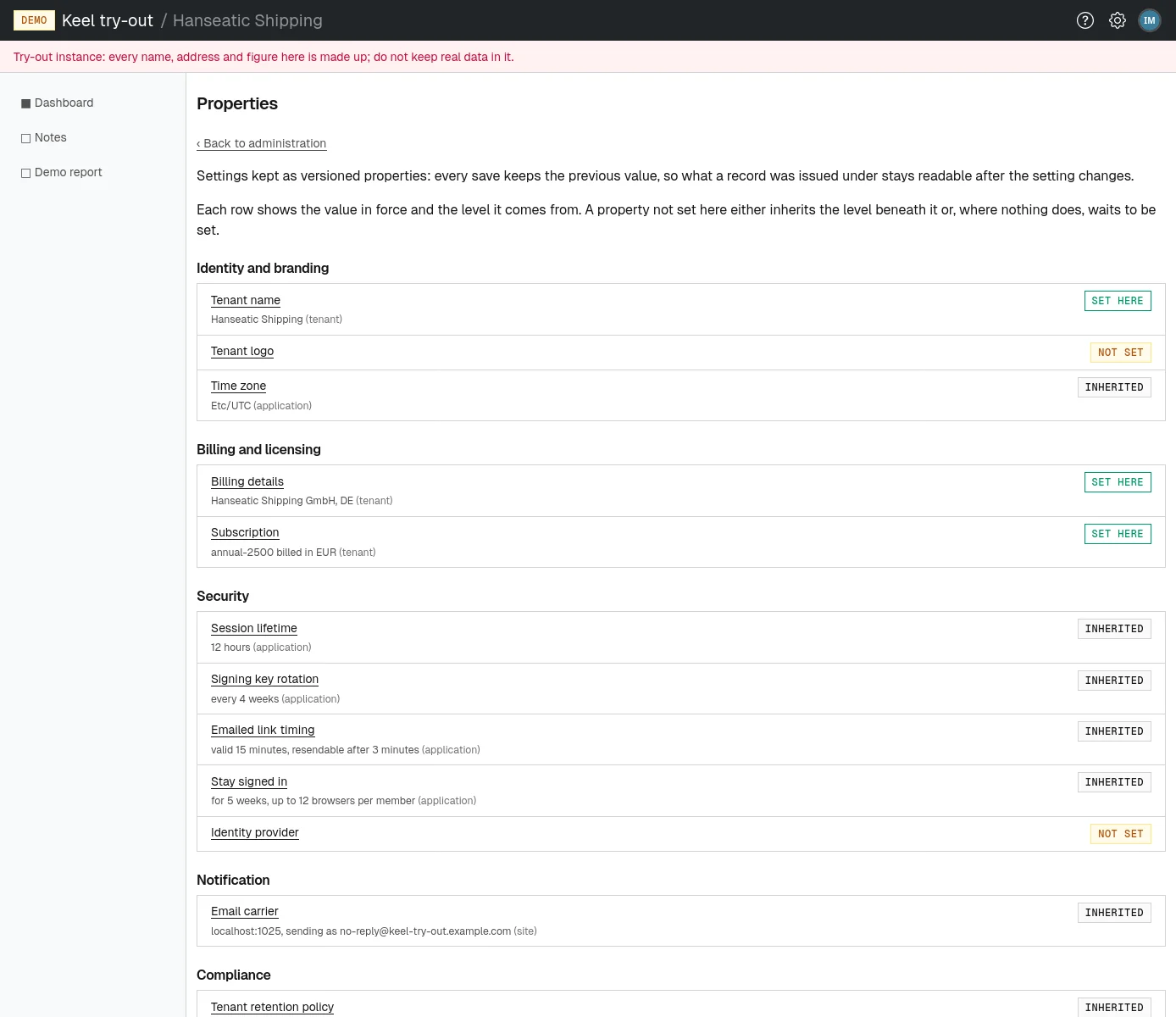
Values set here and inherited values
Many settings have a value even if nobody in your organization ever set one. Keel Platform looks for a value in three places, and the first it finds applies:
- the tenant level: a value your organization set on this page;
- the site level: a value the operators of your Keel Platform site set for every organization;
- the application level: the built-in default.
Each row of the list shows the value in force and, in brackets, the level it comes from, with a badge:
- set here
- Your organization set its own value, which overrides the site's and the built-in one.
- inherited
- Nothing is set here; the site's value or the built-in default applies. If the operators change the site's value, your organization follows.
- not set
- No level provides a value. Some settings are optional and simply stay off; others, like the billing details, need a value before something can happen.
Changing a setting
- Choose the setting's name in the list. Its page says "The value stored at the tenant level." and, below that, what is in force, for example "Not set here, so the site value applies" or "Overrides the application value, which clearing this returns to."
- Fill in the form. Where a setting has several fields, each field shows beside it the value the level beneath provides, so you can see what you are overriding.
- Choose the save button, which names what it saves, such as Save time zone. A green message confirms, for example "Time zone saved at the tenant level."
If a value is out of range, the page shows what is wrong and keeps what you typed.
Fields that take a length of time accept a short notation, explained on the page: for durations such as a session lifetime, w weeks, d days, h hours, m minutes and s seconds (1w2d is 9 days); for calendar periods such as retention, y years, m months, w weeks and d days.
Clearing a value
Where a setting can fall back to a value beneath it, or is optional, its page offers Clear this value.
- Choose Clear this value.
- Confirm "Clear this value? The setting falls back to the one beneath it." The message "... cleared at the tenant level; the value beneath applies." appears, and the inherited value, or none, is in force again.
Clearing deletes nothing: the earlier values are kept in the history.
History of changes
Every save keeps the previous value, so a record made under an older setting can still be read as it was. You can see who changed which setting, when and to what in the audit log: search for the events tenant property set and tenant property cleared. Passwords and other secrets are never shown there, only whether one was set.
The settings your organization can change
| Heading | Setting | What it decides | Described in |
|---|---|---|---|
| Identity and branding | Tenant name | The name shown in the header | Name, logo, time zone and mail |
| Identity and branding | Tenant logo | The logo shown beside the name | Name, logo, time zone and mail |
| Identity and branding | Time zone | The zone dates and times are shown in | Name, logo, time zone and mail |
| Billing and licensing | Billing details | Who invoices are made out to, and where they are sent | Balance, top-ups and invoices |
| Billing and licensing | Subscription | The plan your organization renews into | Billing and licenses |
| Security | Session lifetime | How long a sign-in lasts | Sign-in security |
| Security | Signing key rotation | How often the key that signs sessions and links is renewed | Sign-in security |
| Security | Emailed link timing | How long a password link works | Sign-in security |
| Security | Stay signed in | Whether and how long members may stay signed in on a browser | Sign-in security |
| Security | Identity provider | Signing in through your own identity provider | Signing in through an identity provider |
| Notification | Email carrier | The mail server your organization's email goes out through | Name, logo, time zone and mail |
| Compliance | Tenant retention policy | How long personal data is kept | Data retention |
Some security settings, such as the limit on sign-in attempts and the strength of password storage, are set for the whole site by its operators and do not appear here. Your application may add settings of its own.